






NBAD Balance Check: How to Check Your FAB Account Balance Online
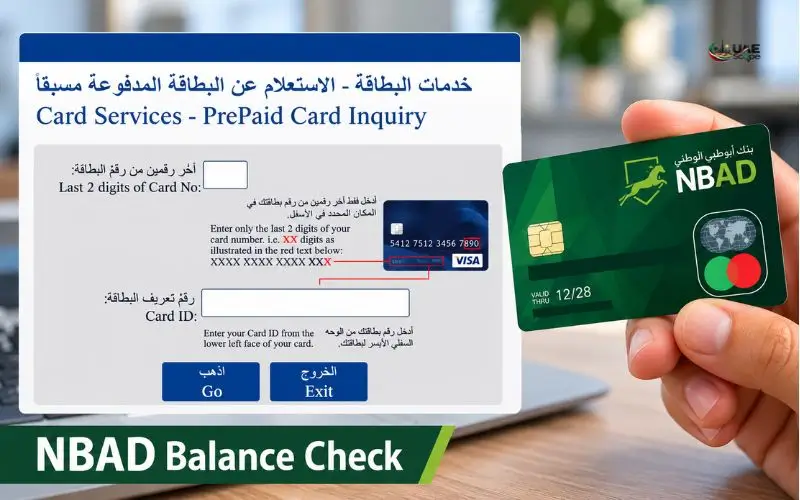
Checking your old National Bank of Abu Dhabi (NBAD) account is easy because the bank merged with First Gulf Bank in 2017 to form First Abu Dhabi Bank (FAB). An NBAD balance check can be performed via the official FAB Mobile app, online banking, or a compatible ATM. Cardholders of Ratibi salary can avail the specific balance enquiry service. It is determined by your account or card type. Use official FAB channels to access your balance safely, and safeguard your banking details.
Quick Facts
| Detail | Information |
| Former bank | National Bank of Abu Dhabi (NBAD) |
| Current bank | First Abu Dhabi Bank (FAB) |
| Merger | 2017 |
| Regular account balance | FAB Mobile or FAB Online Banking |
| Ratibi salary card | Official Ratibi balance enquiry service |
| FAB customer support in the UAE | 600 52 5500 |
| International customer support | +971 2 681 1511 |
| Official website | bankfab.com |
The information on the merger, official banking channels, Ratibi services, and contact numbers has been published on FAB’s website.
What Happened to NBAD?
UAE’s pioneering financial institutions were among them the National Bank of Abu Dhabi. It became First Gulf Bank, and the bank was renamed First Abu Dhabi Bank (FAB). According to FAB’s official archive of mergers, the new shares started trading in April 2017 as FAB.
This change is the reason some older banking instructions may contain a reference to NBAD, although the current banking services are under the FAB brand. Existing customers are advised to determine their current account or card before deciding on which method to use to enquire about their balance.
The difference lies between a regular bank account and a prepaid salary card. Not all of these products are necessarily the same type of digital service; therefore, not all of their login pages or card enquiry procedures will work.
How to Check Your Former NBAD Account Balance Online
FAB Mobile is a good choice for people who have a current or savings account, as the official app allows you to view your balance, make transactions, and receive electronic statements.
1. Use the FAB Mobile App
The mobile app makes it possible for customers who are eligible to check account information without having to go to a branch. To log in to your account, follow these steps:
- Click on the official FAB Mobile page.
- Get the app from an official app store.
- Go to the App and enter the registration or login process.
- Fill out the necessary security checks.
- Click on the “account overview” to check the available balance and to see the recent transactions.
Existing customers are able to register with FAB with their customer number, debit/credit card and a mobile phone that is compatible with FAB along with an internet connection. Depending on the service and registration, it may require Emirates ID verification and a video selfie for the current registration process.
Please note: An old NBAD username/password will not be valid for every new FAB service. In case of login failure, adhere to the current login or account recovery process provided by the bank.
2. Use FAB Online Banking
Customers who prefer to use a computer or mobile browser can also use online banking. It allows you to access certain banking services without having to visit a branch.
To view your account:
- Click on the official FAB website.
- Click on the personal banking login.
- Enter your registered credentials into the official banking service on the Internet.
- Perform any necessary authentication that is provided by a security process established by FAB.
- View account details and make sure you know your balance and transactions.
Some online purchases demand approval via the FAB App, too. This can result in the need for separate steps to access online banking and to authorize transactions.
When entering login details, make sure they are requested on the correct site. Never go to sponsored search results or third-party pages that resemble a bank’s login screen.
3. Check Your Balance at an ATM
When you don’t have access to the internet, or you would prefer not to do the transaction online, an ATM might be a practical alternative.
Use a FAB ATM or another ATM that can support your card and the required service. Put in your card, enter your pin in private and request your balance if offered.
The exact menu and any associated fee will vary, depending on the ATM, card and transaction. Before using an ATM run by another bank, review the terms that are presented.
On FAB’s product information, it states that qualified cardholders are allowed to utilise the ATM service, which includes cash withdrawal service. But that does not imply that all of the ATMs have the same balance enquiry options for all cards.
4. Contact FAB Customer Support
If you can’t log in online, or your card isn’t recognized, ring the bank on an official line.
The following customer contact numbers are published by FAB:
- Within the UAE: 600 52 5500
- Outside the UAE: +971 2 681 1511
These are the numbers that are available on the official website of FAB.
State that you used to have an NBAD account but now need to check what you have at the moment. The support team can help you find the right kind of service you need and tell you what the account verification criteria are.
Never give out your password, PIN, or One-Time Security Code to anyone who calls or messages you saying they were from the bank.
How to Check an NBAD or FAB Ratibi Salary Card Balance
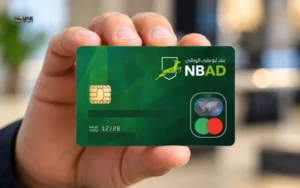
A Ratibi salary card is not a regular current or savings account. According to FAB, Ratibi is a payroll service for eligible workers earning up to AED 5,000, who will be able to receive their salary on a prepaid card without having to open a bank account.
If you are paid by your employer on the Ratibi, the best way to proceed is via the Ratibi PrePaid Card Balances Enquiry service.
Steps for a Ratibi Balance Inquiry
- Access the official FAB Ratibi page.
- Existing Ratibi cardholders: use the link to find the balance inquiry.
- Open the linked enquiry service.
- Please follow the procedure shown on the official page.
- Fill in the information that is requested by the verified service only.
- Check out the balance displayed on the screen.
The official Ratibi page redirects existing cardholders to the separate enquiry facility for balances.
The exact data set needed by the enquiry portal might vary. I cannot vouch for the same online process as it is for all older NBAD prepaid cards—refer to the official instructions for your card.
What If Your Salary Card Is Not a Ratibi Card?
Not all salary cards are Ratibi cards. Other payroll methods are used by some employers, and the balance enquiry process varies according to the product issued to the employee.
Verify the name on your card or the card’s original document. If you are unable to recognize the product, please check with your employer’s payroll staff or contact FAB via their official channels.
Don’t submit your card information to any random website that offers to check your balance for NBAD or salary cards. The instructions provided on third-party websites do not mean that the website is approved to process your card details.
Which Balance Check Method Should You Use?
The right service will save you time and also stop you from keying info right into a web page that is not suitable.
| Your banking product | Recommended method |
| Former NBAD current account | FAB Mobile or online banking |
| Former NBAD savings account | FAB Mobile or online banking |
| FAB debit card linked to an account | FAB Mobile, online banking, or a compatible ATM |
| FAB credit card | FAB Mobile or online banking |
| Ratibi payroll card | Dedicated Ratibi balance enquiry |
| Other prepaid salary card | The service specified for that card |
| Login or card access problem | Official FAB customer support |
These options are based on the official website of FAB. This will depend on your account status, card type, and registration.
If you are considering checking your NBAD balance online, consider if you require to look at a bank account balance, credit card balance or available money on a prepaid salary card. The quantity of these can have different meanings.
For instance, a current account balance is the amount of money in the bank account, and a credit card balance is the balance you owe the card issuer. The amount of money that is available through a prepaid card is indicated by a prepaid card balance. Choosing the right service helps you to eliminate the confusion of these numbers.
Common Problems and How to Resolve Them
The Old NBAD Website Does Not Work
The merger resulted in a brand revamp as well as digital services for the bank. You can find a site for an old NBAD login page, which can contain instructions that are no longer valid or unofficial sites.
Access FAB’s official website and choose the service for your account. The new name for the bank was confirmed by FAB’s merger archive in 2017.
You Cannot Log In to FAB Mobile
A login issue could be associated with either registration or authentication, or it could be a problem with the device you are using. If the service returns an error saying that access is denied, do not enter bad information again.
Rather, go to the official mobile banking page and follow the registration or recovery procedures offered. If you can’t access your account, please call the customer service line with an authorized phone number.
Your Salary Has Not Appeared
If you have not been paid and the credit you were expecting is missing, review the transaction history and ask your employer’s payroll department about the payment.
The employer can be a valuable point of contact when it comes to payroll-related queries for Ratibi cardholders. Under FAB’s Ratibi information, it is employers who are the point of contact for their employees in pertinent payroll arrangements.
If a salary payment is not received, don’t assume that your card is blocked. Without the specific cause or payroll record, it is not possible to determine the cause.
The Balance Looks Incorrect
Check recent transactions, pending card activity, withdrawals, and payments if the balance shown doesn’t match what you think it should be.
Check your available balance against your most recent statement or card. If you still can’t explain the difference, reach out to FAB via a proper channel and request to have a look at the transaction history at the bank.
Don’t put your account number or card number on a public website, but remember your transaction date and reference number when talking to support.
Your Card Is Not Accepted by the Enquiry Portal
Verifythe card product name and follow FAB’s instructions. If the card is old, expired, damaged or not recognised ask the bank if they need it to be replaced or need to be submitted by another method of verification. Without the bank records relating to a specific legacy card, I cannot verify a card’s status.
Security Tips for Online Banking
Banks’ sites and apps are also sensitive – if you use an untrusted service, you may be asked for your balance and sensitive financial data may be given out.
Be sure to take these precautions when checking your money:
- Follow the official channels: Use FAB’s official website or app store.
- Always hide the keypad at an ATM and never give your card number’s PIN away.
- Never share security codes: FAB advises users to not share their security codes with individuals that reach out to them via SMS, WhatsApp, or email.
- Never click on suspicious links: Do not log in using e-mail messages that state that your account is suspended or that you must “verify your account” with the Site urgently.
- Enter banking information only on secure devices: Do not give banking details on untrusted or public devices.
- Regularly monitor transactions: Report unusual activity via the bank’s proper channels.
Contact FAB immediately should you think that someone may have accessed your account. Don’t wait for another transaction to show up before reporting a possible security problem.
Conclusion
It’s easy to check an old NBAD account once you’ve found the right service. Those who have current and/or savings accounts should use FAB Mobile or personal online banking, and those who have salary cards should use the dedicated prepaid card enquiry facility.
To find out the balance on your NBAD,you should use the official FAB website, register following the current procedure, and reach out to customer support if your account or card is not recognised. This is to get the right kind of service without having to access the outdated NBAD instructions or the websites which cannot be trusted for checking your balance.
Read Also: FEWA Quick Pay
Frequently
Is NBAD still operating as a separate bank?
In 2017, NBAD was merged with First Gulf Bank to become First Abu Dhabi Bank (FAB). Existing customers should continue to do business with FAB’s current banking services.
How can I check my old NBAD account online?
Access the official FAB Mobile app or online banking. Log in using registered credentials and view transactions and account balance.
Can I check my account balance without visiting a branch?
Yes. Depending on the account and card type, you can check your balance using FAB Mobile, online banking, or a compatible ATM.
How can I check my Ratibi salary card balance?
Check the official FAB Ratibi website and activate the balance enquiry service for FAB Ratibi customers.
What is the FAB customer care number?
FAB lists 600 52 5500 for calls within the UAE and +971 2 681 1511 for international callers. Check the official FAB website for information.
Can I check my Ratibi salary card balance without a bank account?
Yes. Qualifying Ratibi cardholders can make payments to the fromank at their salary and can enquire about the balance of their card without creating a separate bank account.
What should I do if my balance is not showing?
Check your internet connection and confirm that you are using the correct FAB service. Please reach FAB customer support if this problem persists via a FAB official channel.
Lulu Balance Check UAE: Cards, Wallet & Remaining Funds
17th Oct 2026[…] NBAD Balance Check: How to Check Your FAB […]