






Nol Card Balance Check: How to Check Your Balance Online in Dubai

The Dubai public transport Nol Card Balance Check feature allows users to check their card balance before they get on a train. Your account balance can be accessed on the official RTA website and via the nol Pay app with your card details. The nol card is operated by Dubai’s Roads and Transport Authority (RTA) and can be used for all Metro, buses, trams, and other transport services supported by Dubai. By checking the balance before the trip, you can avoid payment problems. It also helps you to know when you will need to top up your card. Using the correct card information, it only takes a small amount of time to check the balance.
Quick Facts About Nol Card Balance Check
| Detail | Information |
| Official authority | Roads and Transport Authority (RTA), Dubai |
| Main online method | RTA website |
| App method | nol Pay app |
| Information needed online | 10-digit nol Tag ID |
| Where to find Tag ID | Printed on the back of the physical nol card |
| Minimum balance for normal card use | AED 7.50 |
| Personal nol card validity | 5 years |
| Anonymous Silver/Gold card maximum balance | AED 1,000 |
| Registered Silver/Gold card maximum balance | AED 5,000 |
| Official app | Nol Pay |
According to the current service information by the RTA, the internet system and the nol Pay app can be used to verify the balance of a nol card. In addition, RTA says that there is a minimum balance of AED 7.50 to be used on a standard card at Metro gates and at public transport entry points.
How to Check NOL Card Balance Online Through the RTA Website
If you don’t want to download an app to check your RTA balance, the easiest method is the RTA website.
There is a Check NOL Balance service on the RTA website at present. The NOL Tag ID is requested by the service, and it’s the number that corresponds to the NOL physical card.
Steps for an RTA NOL Card Balance Check
- Visit the official RTA Dubai website. Go to the official RTA Dubai website.
- Go to the Check NOL Balance option.
- Type in your NOL Tag ID.
- Click in the box labeled Search or in the checkbox beside it.
- Take a glance at your card’s balance details.
There’s a dedicated Check NOL Balance field on the RTA home page, and the information being required is labelled as the NOL Tag ID.
Where Is the NOL Tag ID?
The number on the physical card is your NOL Tag ID. RTA’s own instruction material lists it as a 10-digit number on the bottom of the NOL card.
When using the balance online, please ensure the Tag ID is entered correctly. It’s not just a random card number or mobile number being typed.
How to Check Nol Card Balance Using the Nol Pay App
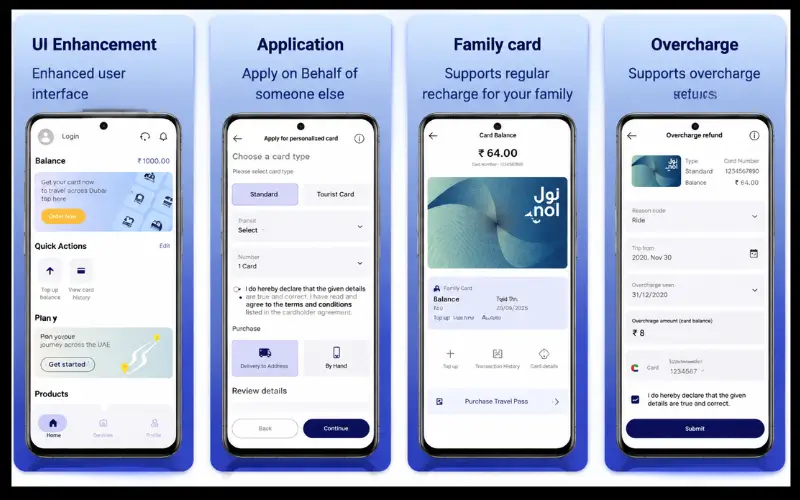
The nol Pay app is the official application of RTA to manage nol cards and the various services. According to the RTA, the app enables all users to see their nol card balance instantaneously, replenish their cards, bank their cards, and avail other nol services.
The app can also offer details of the cards and transaction history. RTA publishes educational content with a Check Card Info function that allows users to input their Tag ID or scan a physical Nol card with NFC on an appropriate smartphone.
How to Check Your Balance in Nol Pay
- Log in to Nol Pay and go to the card-management section.
- Click on Check Card Info.
- Enter the Nol Tag ID, or scan the NFC card using the supported functionality.
- Check the balance, pending, and card details on the display.
The physical card is positioned over the NFC region of a compatible phone when using NFC scanning. The RTA guide indicates both Tag ID entry and NFC scan as means to access the card information.
If you use your card often, the app’s handy, as it will let you check your balance, among other card-management features, without having to go to a web page.
What Information Can You See During a Nol Card Balance Check?
It is helpful to see where both numbers are in relation to each other, rather than just one. RTA Nol digital tools can display card details based on the information and service available.
For instance, in the card-information interface, the Nol Pay instructional material provides display of balance, pending amount, transaction history, card type, Tag ID, expiry date, and card status.
This is an important factor if you recently charged items to your card.
A summed amount pending does not imply that the funds are immediately available for travel. RTA clarifies that some funds topped up online must be activated for use.
Why Your Nol Card May Show a Pending Balance
After topping up a Nol card, one of the primary pieces of information that you must be aware of is the distinction between available balance and pending top-up.
According to RTA, the amount can only be topped up online via supported channels. It also states that pending amounts have to be activated within 180 days of the transaction date.
According to the RTA, the balance of a physical Nol card can be activated instantly after scanning and tapping with Nol Pay or S’hail.
This is the reason that a person could recharge online and not see the new balance immediately.
What to Do If a Top-Up Is Pending
If there is a pending amount indicated on your Nol Card Balance Check:
- To see if the top-up was applied online, via an activation process.
- Use an approved method of activation.
- If using Nol Pay/S’hail top-up for a supported physical card, tap the card according to the instructions in the app.
- Recheck card info after activation.
RTA also indicates that any pending topping can’t be activated on a blocked or expired card.
What Is the Minimum NOL Card Balance Required?
RTA currently recommends that passengers keep a minimum balance available on a basic NOL card of AED 7.50. The minimum balance required for it to be used at the gates of Metro is AED 7.50, and for activating a pending balance by the process supported by it, AED 7.50 is also the minimum amount required.
This is significant as having a little cash on the card does not necessarily guarantee starting any journey!
For instance, if your card has only a little remaining on it, it might be denied entrance to Metro by the gate despite having an account balance greater than $0. Thus, the current guidance offered by RTA is very useful before traveling to check the available balance.
What Is the Maximum Nol Card Balance?
The limit varies according to the card type and registration status.
The current Nol card information does not show any limits on balances for anonymous silver and gold cards, and registered silver and gold cards have a maximum limit of AED 5,000. A Personal Nol card also has a maximum amount of AED 5,000.
If you have a larger sum on your card on a regular basis, you will be able to take advantage of this difference. An eligible anonymous card may also offer other card-management and balance-protection features.
Nol Card Types and Their Balance Limits
| Nol card type | Maximum balance | Validity |
| Silver Card — anonymous | AED 1,000 | 5 years |
| Silver Card — registered | AED 5,000 | 5 years |
| Gold Card — anonymous | AED 1,000 | 5 years |
| Gold Card — registered | AED 5,000 | 5 years |
| Personal Nol Card | AED 5,000 | 5 years |
| Nol Red Ticket | Maximum use of 10 journeys or 5 daily passes | 90 days or 10 trips |
The limits and validity periods in the RTA’s current card information are confirmed. Unlike rechargeable cards (Silver, Gold and Personal), the Red Ticket is a paper disposable ticket which contains a set journey/pass usage count.
How NOL Card Balance Is Used for Public Transport

NOL balance is not just a holding balance for Metro trips. It is part of Dubai’s international public transport payment system.
According to RTA, NOL cards are accepted for Dubai Metro, buses, Dubai Tram and marine transport, and selected non-transport services like RTA paid parking and some retail payments.
The fare will be automatically calculated and deducted based on the applicable journey rules when travelling. The Metro gates determine the cost of the trip by the number of zones crossed,” explains RTA.
That’s why it is better to check your balance before you begin a trip rather than after you’ve got your card declined.
What If Your Nol Card Balance Is Too Low?
If your balance is not enough, you are able to load the card on the channels supported by RTA.
Currently, RTA’s service information includes Nol Pay, S’hail, the RTA website, Dubai Now, ticket vending machines, and selected authorised sales channels. The amount of the minimum top-up depends on the channel. For instance, RTA currently shows a minimum of AED 5 for a number of channels, and there are other channels with differing minimums.
After topping up online, remember that the amount may initially appear as pending. If activation is necessary, please activate before using the new balance for travel.
Can You Check Nol Card Transaction History?
Yes. The Nol Pay app isn’t just a balance display. RTA has published a guide to its app which includes the History option as well as card balance and card information.
Useful when you want to see what caused the transaction to alter (such as after several public transport trips or a recent top-up).
Checking the card’s available transaction data may be helpful if this balance is not as expected, before contacting RTA.
What Happens If Your Nol Card Expires?
Each type of Nol card is valid for a different period of time. The Silver, Gold, and Personal Nol cards have been set to five years on RTA’s list; the Red Ticket is on its own journey/time validity rules.
The pending top-ups may also be affected by an expired card. According to RTA, the amounts added to the expired or blocked cards cannot be activated.
So, if the top-up is not showing as usable, it might be worth checking the status and expiry date of the card via the digital services of RTA.
Can You Recover the Balance From a Lost or Damaged Nol Card?
It depends on the situation and whether the card is registered and/or if the user has exceeded their time limit.RTA offers a Refund Nol Cards Balance service that includes personal, registered, and anonymous Nol cards, and certain overcharge claims. RTA also clarifies that, in certain circumstances, registered or Personal cards have mechanisms for protecting or transferring the remaining balances.
Currently, RTA has positioned a charge of 2.5% or AED 5, whichever is more, for a cash refund, and the transfer to another registered card or NOL card is free.
Refunds are dependent on the card status and reason for requesting a refund, and it is best not to assume that because a card was lost or damaged in any way, it will be treated the same way for a refund.
RTA Nol Card Balance Check vs nol Pay
Both of these are useful, but they’re both different.
| Method | Best for | What you need |
| RTA website | Quick online balance enquiry | No tag ID |
| Nol Pay app | Balance, card information and management | App + card details or supported NFC |
| RTA digital NOL services | Broader card management | Relevant card information/account details |
RTA also makes a point of highlighting the NOL Pay and the RTA website’s NOL Card Balance service as a means of checking the balance.
If you only want to do a one-time check, it may be simpler to go with the website. NOL Pay has a more extensive range of functions for regular users, including topping up, review history, and managing cards. RTA also provides physical-card management via the App.
Common NOL Card Balance Check Problems
A balance check sometimes can be an unexpected result. The problem doesn’t always involve the loss of money.
Common situations include:
- Recent top-up appears as pending: the amount could need to be activated before it can be used.
- Card expired or blocked: RTA states that pending top-ups of expired or blocked cards can’t be activated.
- Incorrect Tag ID: The online service requires the card’s Tag ID, so check the number printed on the back of the physical card.
- Balance is below the required minimum: RTA advises maintaining at least AED 7.50 on a standard nol card for public transport use.
If the issue is not resolved, use RTA’s official customer service and nol card services, and not unofficial websites that offer balance-check services.
Conclusion
A Nol Card Balance Check is a quick and helpful way to find out the amount of money in your card before travelling around Dubai. The balance can be checked easily on the official RTA website by providing the NOL Tag ID, which is a 10-digit number, or via the Nol Pay application, where you can view your balance, card details, and transaction history. Having a sufficient balance on your credit card can help you travel without any hassles or problems. If you made a recent top-up and the amount is pending, then you might need to go through the top-up process to use it. Please use official services of RTA for the most up-to-date and accurate information.
Frequently Asked Questions
How can I check my Nol Card Balance online?
To check your Nol Card Balance, you must visit the official website of RTA. Click on Check Nol Balance, enter your Nol Tag ID, and send the enquiry. The RTA has also confirmed the availability of the balance checking service in the Nol Pay App.
What is the Nol Tag ID?
The Nol card ID is the Nol number you have on your physical Nol card. RTA’s instructional guide states it is a ’10-digit number on the back of the card’.
How much balance do I need on my NOL card?
RTA recommends having a minimum of AED 7.50 on a normal NOL card for public transportation. You can also find that AED 7.50 is the minimum service requirement to be activated by pending balance at Metro gates in its service FAQ.
Can I check my NOL balance without the RTA website?
Yes. One can check the details of the cards and the balance via the official NOL Pay app. Other digital card management services provided by RTA include support for other card-service providers.
Why is my NOL top-up showing as pending?
Some of the top-ups online need activation before they’re able to be used. RTA said pending online top-ups are subject to the channels that are supported and must be activated within 180 days of the transaction.
Can I check my Nol card transaction history?
Yes. According to RTA’s Nol Pay guide, users will also be able to find out the history along with information on their cards, such as their pending amounts and balance.
What is the maximum balance on a Silver Nol card?
Currently, RTA provides no information regarding the balance that can be loaded onto the Silver card, but according to an anonymous source, a Silver card can have a maximum balance of AED 1,000, while a registered Silver card can have a maximum balance of AED 5,000.
How long is a Nol card valid?
RTA currently has a five-year validity for Silver, Gold and Personal Nol cards. Some Red Ticket validity conditions vary depending on the journeys or passes authorised in the Red Ticket.
Can I recover my Nol balance if my card is lost?
Personal and registered Nol cards are eligible for balance recovery and balance transfer services offered by RTA’s refund and card management. Eligibility varies based on the situation and card.
Can I use my Nol card for things besides public transport?
Yes. According to RTA, the Nol cards can also be used for some non-transport services like RTA paid parking and some retail payments.